
Every few days we get a message like this one: "I play [X], it's not on your list, will EchoControl work for me?" Five games aren't every game that exists, and they never will be.
This whole blog has spent weeks insisting on the same thing: EchoControl needs no configuration, it works the moment you install it. And then there's Custom Profile, the one part of the app that's literally a blank form you have to fill in yourself.
That's not a contradiction. It's the other half of the product.
Why we built it
Five ready-made profiles cover a lot, but they don't cover someone who plays almost exclusively a title that isn't on that list. For that person, EchoControl without Custom Profile would be a half-promise: "works great, as long as you play whatever we decided to support."
We didn't want to be that. We wanted someone who doesn't touch any of the five games to still get full value from the app on day one.
Custom Profile solves that in two different ways, and the second one is the one that surprised us most once we saw it actually being used:
- A dedicated profile for the specific game you play that we don't support — you decide the commands.
- A universal layer, the same across any game: save game, load game, open the map, pause, screenshot. Things you repeat in every game you touch, set up once.
The second one wasn't in the original plan. It came out of watching how people actually used it.
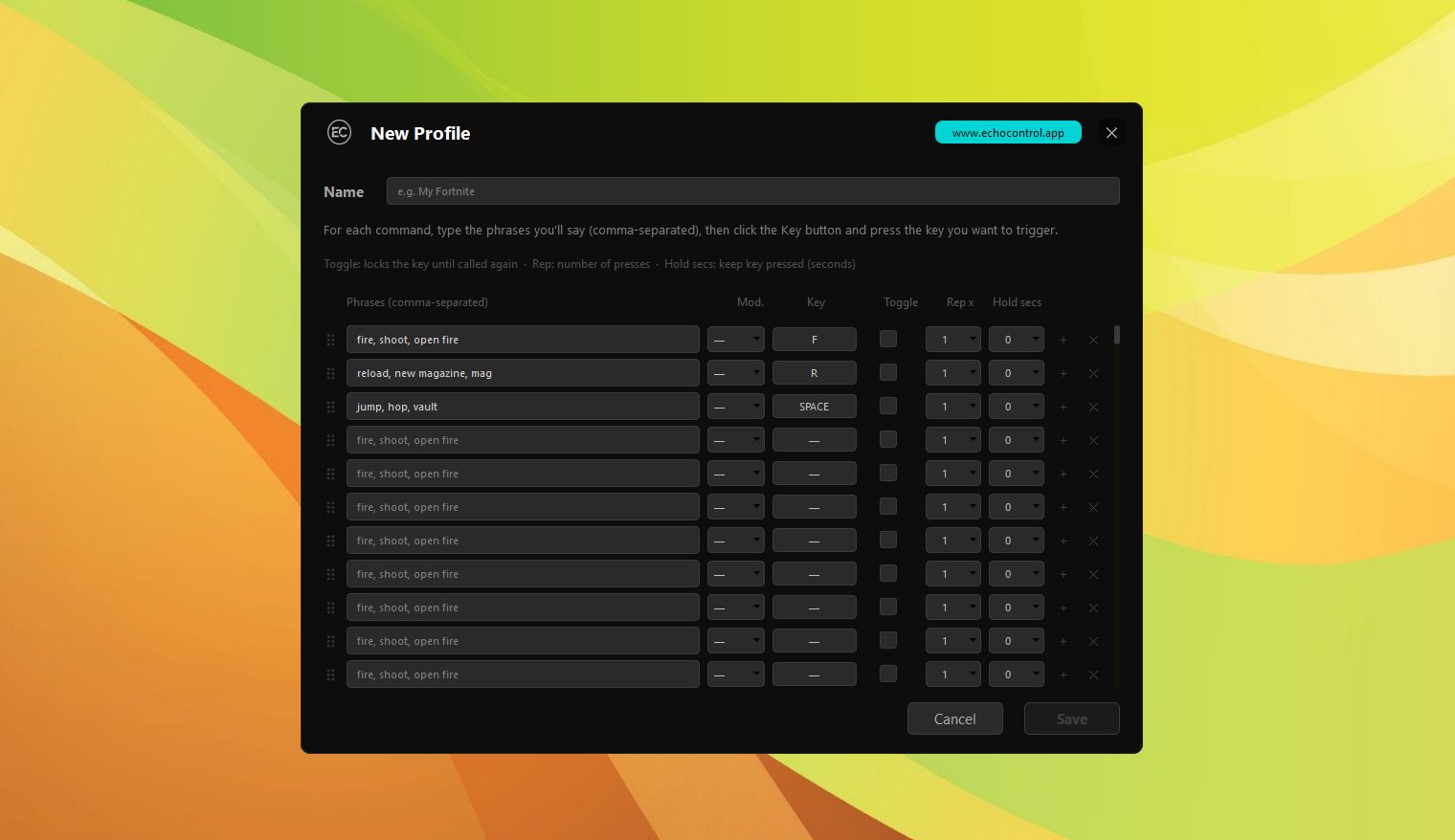
What you can actually configure
None of this asks you to write a single line of script. It's a table, field by field:
- Phrases, comma-separated — "fire, shoot, open fire" all trigger the same command, as many variants as you want for the same action.
- Key and modifier — click the field, press the key you want, done. Alt, Ctrl, or neither.
- Toggle — the key stays pressed until you say the command again, instead of a single tap.
- Rep x — repeats the keypress 1 to 3 times.
- Hold secs — holds the key down for up to 3 seconds.
You can create as many named profiles as you want — one per game, one for your streaming setup, whatever you need — and each one supports up to 200 commands. Profiles export and import as .zip files, so if someone in your community already built one for a game you play, they hand it to you and you load it straight in.
200 commands is the ceiling, not the goal. Almost nobody hits it.
Most people we've seen use this set up a handful of commands — "fire," "reload," "jump," "map," "save" — and they're done in five minutes. The high ceiling is there for when someone genuinely needs it, not as something to aim for.
Why this doesn't break the zero-configuration rule
Here's the honest nuance: yes, Custom Profile is configuration. What it isn't is what the macro tools we usually get compared to make you do — no scripting language to learn, no code editor, no learning curve before you can say your first command out loud.
The difference isn't whether you configure something. It's how much. The five profiles we already ship stay zero-configuration, always. Custom Profile is the way out for everything else, and that way out is still a table with clicks, not a language to learn.
The 200 ceiling works for us too
When someone reaches 200 commands, the app itself tells them and offers to request an official profile for that game. That's not just courtesy — it's the most honest signal we have for which game is genuinely worth supporting, more reliable than any survey. If a lot of people are building a large Custom Profile for the same game, that game moves up the list of candidates for an official one.
So if your game isn't one of today's five, it's not a permanent no. At most, it's a "not yet" — and in the meantime, you have a real way to not be left out.
Try Custom Profile with your own game and see for yourself.