Euro Truck Simulator 2 voice commands
EchoControl recognizes 54 voice commands for Euro Truck Simulator 2, in English and Spanish, with speech recognition running locally on your PC. One-time purchase, 9,99€. Long hauls call for both hands on the wheel. With EchoControl you can manage lights, gears, cameras, and navigation without ever leaving the steering position. Keep your eyes on the road — let your voice do the rest.
Updated for EchoControl 1.1.1
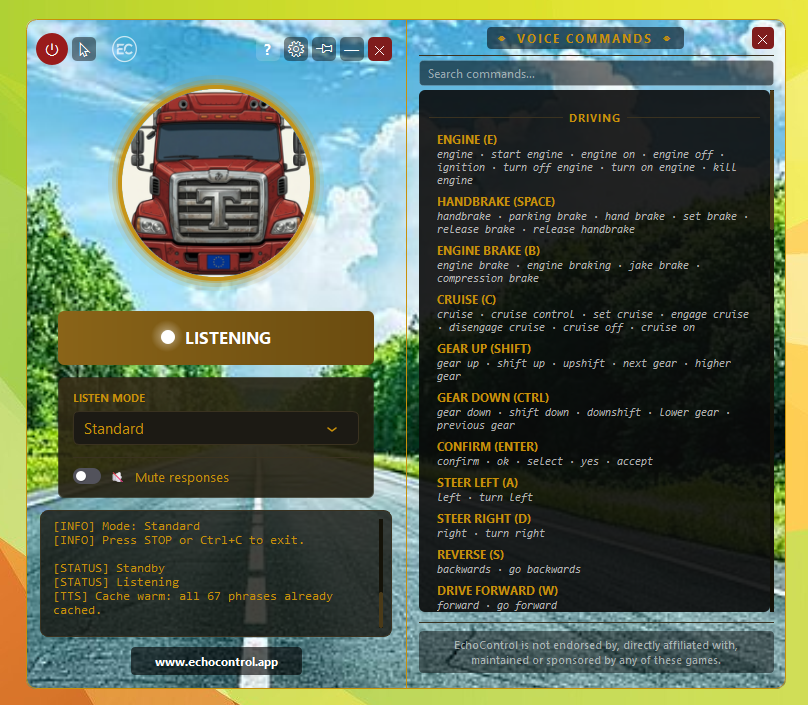
See EchoControl in action
🔇 Prefer it quiet? The voice that answers your commands is optional. You can switch it off from the main window at any time.
Driving
Core driving controls. Useful for managing engine, gears, and cruise without reaching for the keyboard on a long stretch of highway.
| Say | Action |
|---|---|
enginestart engineengine onengine offignitionturn off engineturn on enginekill enginestop engineturn engine onturn engine off | EngineE |
handbrakeparking brakehand brakeset brakerelease brakerelease handbrakehandbrake onhandbrake offparking brake onparking brake off | HandbrakeSPACE |
engine brakeengine brakingjake brakecompression brakeengine brake onengine brake off | Engine BrakeB |
cruisecruise controlset cruiseengage cruisedisengage cruisecruise offcruise oncruise control oncruise control off | CruiseC |
gear upshift upupshiftnext gearhigher gear | Gear UpSHIFT |
gear downshift downdownshiftlower gearprevious gear | Gear DownCTRL |
confirmokselectyesacceptcontinue | ConfirmENTER |
leftturn left | Steer LeftA |
rightturn right | Steer RightD |
backwardsgo backwardsreverse | ReverseS (hold) |
forwardgo forward | Drive ForwardW (hold) |
Lights
Control all lighting systems on your rig. Particularly handy at night or when entering tunnels, where you'd otherwise hunt for the right key.
| Say | Action |
|---|---|
lightstoggle lightslight modecycle lightsturn on lightsturn off lightslights onlights off | LightsL |
high beammain beambrightsfull beamfull lightshigh beamsfull lights onfull lights offhigh beams onhigh beams offbrights onbrights off | High BeamK |
hazard lightshazardsfour waysemergency lightshazard onhazard offhazards onhazards offhazard lights onhazard lights off | HazardF |
left indicatorleft signalblinker leftleft blinkerindicate left | Indicator Left` |
right indicatorright signalblinker rightright blinkerindicate right | Indicator Right |
warning lightswarningbeaconorange lightsblinkersall blinkerswarning lights onwarning lights offwarning onwarning offbeacon onbeacon off | WarningO |
flashlight signalflash lightsheadlight flash | FlashJ |
double flashdouble light signaldouble flash lightsflash twice | Double FlashJ x2 |
Truck
Secondary truck systems — noise, comfort, and cargo management.
| Say | Action |
|---|---|
hornhonkbeepsound signalblow horn | HornH |
wiperswindscreen wiperswiperwindshield wiperswiper on | WipersP |
radioaudio playermusicopen radio | RadioR |
dashboarddisplay modedashdashboard mode | DashboardI |
trailerconnect trailerdisconnect trailerhook trailerunhook trailerattach trailerdetach trailer | TrailerT |
mirrorsshow mirrorshide mirrorstoggle mirrorsside mirrors | MirrorsF2 |
Camera
Switch between the nine available camera views. Say the camera name or call it by number — both work.
| Say | Action |
|---|---|
interiorinterior camerainsidecabin viewcabin cameracamera one | Cam Interior1 |
follow camfollowing camerachase camfollowchasing cameracamera two | Cam Follow2 |
verticalvertical cameratop viewoverheadtop down cameracamera three | Cam Vertical3 |
roof camroof cameraroof viewroof top cameracamera four | Cam Roof4 |
rear viewrear cameraback camrearlean on cameracamera five | Cam Rear5 |
bumper cambumper camerafront camfront camerabumpercamera six | Cam Bumper6 |
wheel camwheel camerawheel viewon wheel cameracamera seven | Cam Wheel7 |
exteriorexterior cameraoutsideoutside viewdrive by cameracamera eight | Cam Exterior8 |
next cameranext camswitch cameracycle cameracamera nine | Cam Next9 |
Navigation
Access maps, widgets, and truck status. Useful at rest stops or while parked, so you can check your route without alt-tabbing away from the cab.
| Say | Action |
|---|---|
mapworld mapopen mapshow mapbig map | MapM |
route advisor moderoute advisor changeroute advisor displayadvisor modeadvisor changeadvisor display | Routeadvisor ModeF3 |
truck adjustmenttruck adjustmentstruck servicestruck seatstruck mirrorstruck lightsopen truck adjustmentopen truck adjustmentsopen truck servicesopen truck seatsopen truck mirrorsopen truck lights | Truck AdjustmentF4 |
gpsnavigationgps modenavigation modeopen gpsopen navigationopen gps modeopen navigation mode | Routeadvisor NavF5 |
widgetswidget optionswidgets optionswidget configurationwidget configurationswidget settingswidget menuopen widgetsconfigure widgets | WidgetsF6 |
diagnosticstatusdiagnostic modestatus modeopen diagnosticopen statusopen diagnostic modeopen status mode | Routeadvisor DiagnosticF7 |
chatchat modeopen chatopen chat modetruck chat | Routeadvisor ChatF9 |
next pagenext screen | Routeadvisor NextNUMPAD0 |
garagegarage manageropen garagetruck garage | GarageG |
menumain menucontrol panelescapeback to menugame menu | MenuESCAPE |
pausehelphelp screen | PauseF1 |
Direct Keys
Press the number keys 1 to 9 by voice. Always say "press" or "key" before the number, so a stray number in conversation never fires a key. In the cab, 1 to 9 are the camera views.
| Say | Action |
|---|---|
press onekey one | Press 11 |
press twokey two | Press 22 |
press threekey three | Press 33 |
press fourkey four | Press 44 |
press fivekey five | Press 55 |
press sixkey six | Press 66 |
press sevenkey seven | Press 77 |
press eightkey eight | Press 88 |
press ninekey nine | Press 99 |
Play Euro Truck Simulator 2 with your voice
Every command above ships ready to use. No keybinds to memorize, no training, no setup.
Get EchoControl — 9,99€